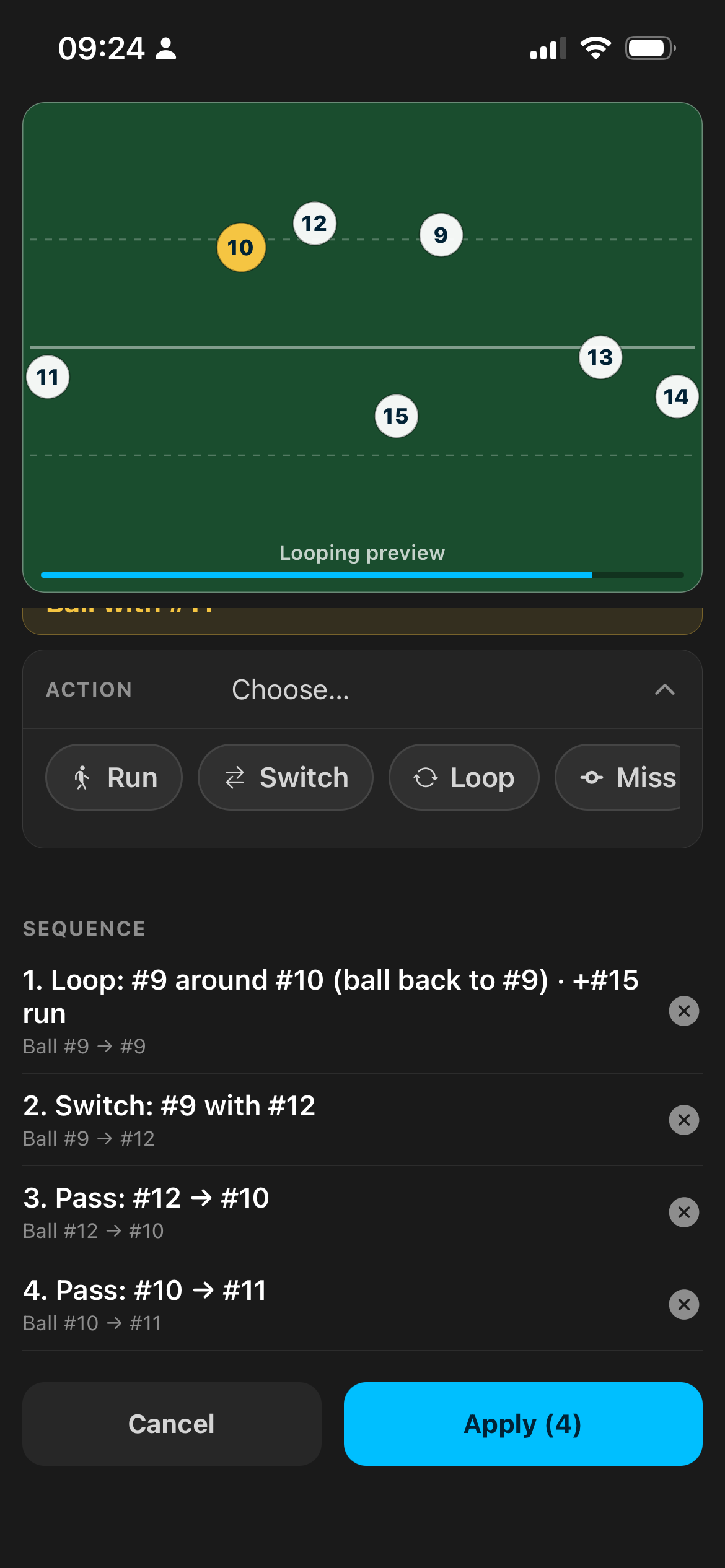
Move Builder
Why it exists
The problem we solve
Most coaching apps leave you drawing arrows forever — or stuck with a static whiteboard photo nobody opens again.
Coaches need something that matches how rugby actually flows (possession, lines, timing), is fast enough to use on the sideline or Monday-night planning, and that players can watch and actually remember.
Rugby Moves is that tool — inside Get The Game On, next to clubs, fixtures, and the rest of your club life.
Who it's for
Coaches & managers
Plan the week's shapes in minutes. Share the exact play your 1st XV or age-grade need tonight.
Players
Stop guessing the call. Tap Focus on your number, watch only your path, show up knowing the timing.
Clubs without an analyst
You don't need fancy software. You need Move Builder and a phone.
Touch & solo prep
Touch templates and personal private moves if you're drafting alone before sharing.
Move Builder
What's new: Move Builder
Build a Switch, Loop, or Miss without tapping every yard of every run.
Open a move → Edit → tap the phase title → Move Builder. Then the stepped builder does the thinking with you:
Ball with #X
we already know who's carrying
Action
Run · Switch · Loop · Pass · Miss · Crash
With
tap the partner (Miss: who you're missing, then Pass to; Run: who runs)
Also run
optional — e.g. #15 runs while 9 loops 10
Save step · Apply
stack the next with THEN, then write paths and possession onto the pitch
Live preview loops while you build. Timing runs at a steady player speed, so legs don't look robotic. This is the difference between “I'll sketch it later” and “we'll run that on Thursday.”
Build & coach
Start from real shapes
Templates ready when you hit + — no blank terror, no empty grid.
Standard backs
9–15 set for open play.
Lineout 5 / Lineout 7
Five- and seven-man lineout starts with depth behind.
Touch · Blank
Mids, links and wings — or an empty pitch if you're building from scratch.
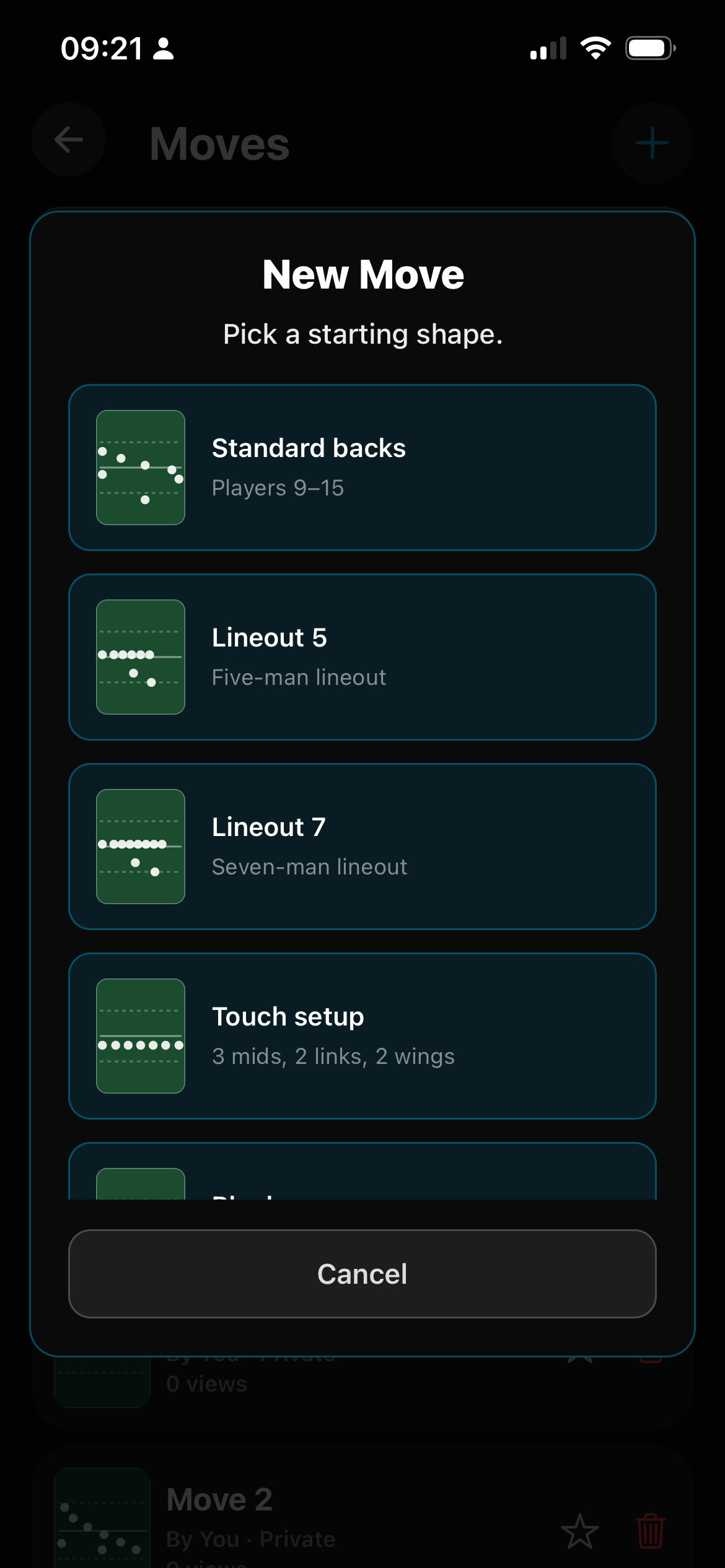
Templates — backs + Lineout 5 / 7
Positions → Move Builder → motion → ball → defence
Clear edit modes that match how you talk on the grass:
Positions
place the squad
Move Builder
auto-build the clever bits
Manual motion
freehand for the one weird decoy
Ball
scrub time, tap who gets it
Defence
static line, active chase, or fully manual defenders — show how a move creates a gap
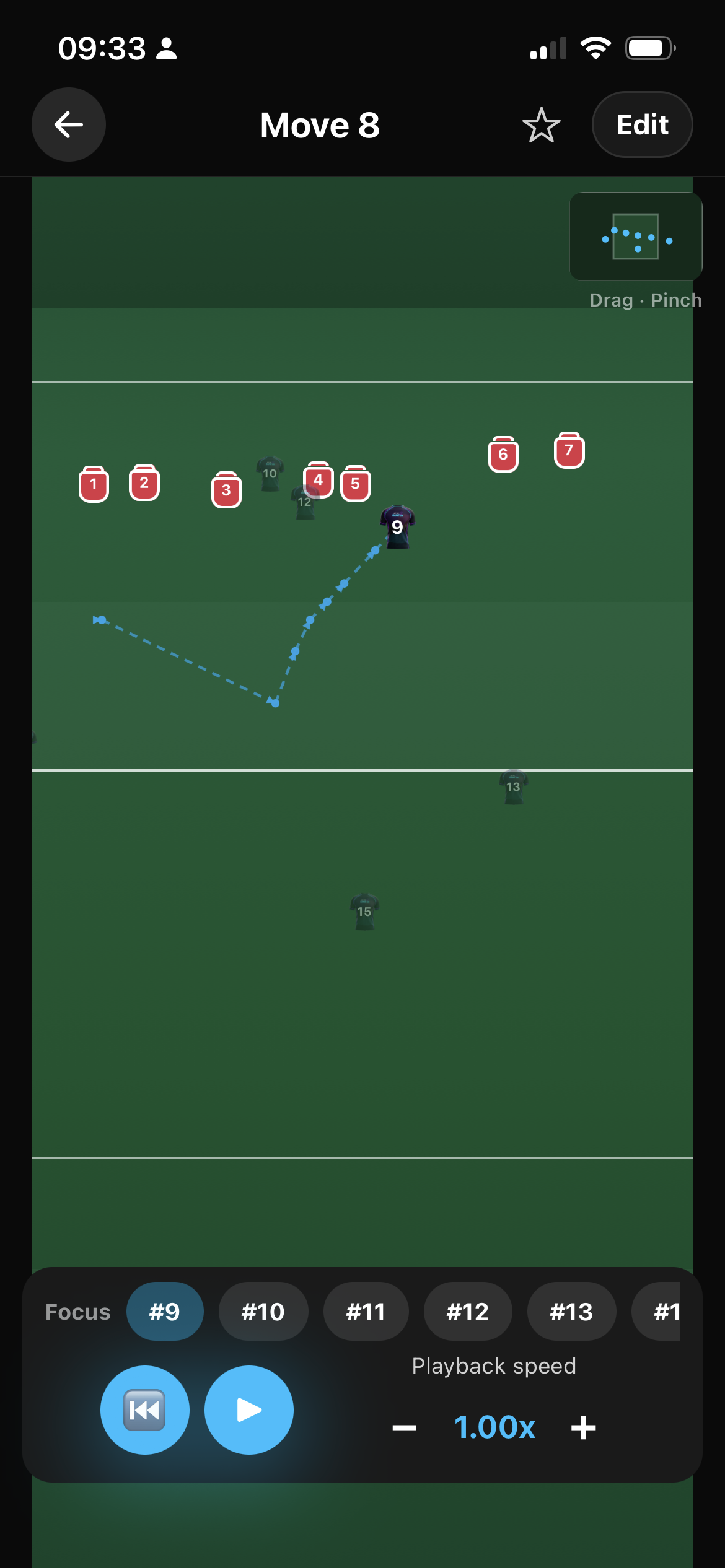
Manual defence — show the gap
A real zoomable pitch — loads of space
This isn't a sticky note with five dots in the middle.
Pinch & drag
Zoom in for detail or out for the whole shape. Drag around a wide world — space left and right of the usual frame, and room up/down the field.
Room for real shape
Place wings where wings actually live; build a sweep that starts wide; set a lineout with depth behind. Edit or play — the camera is yours.
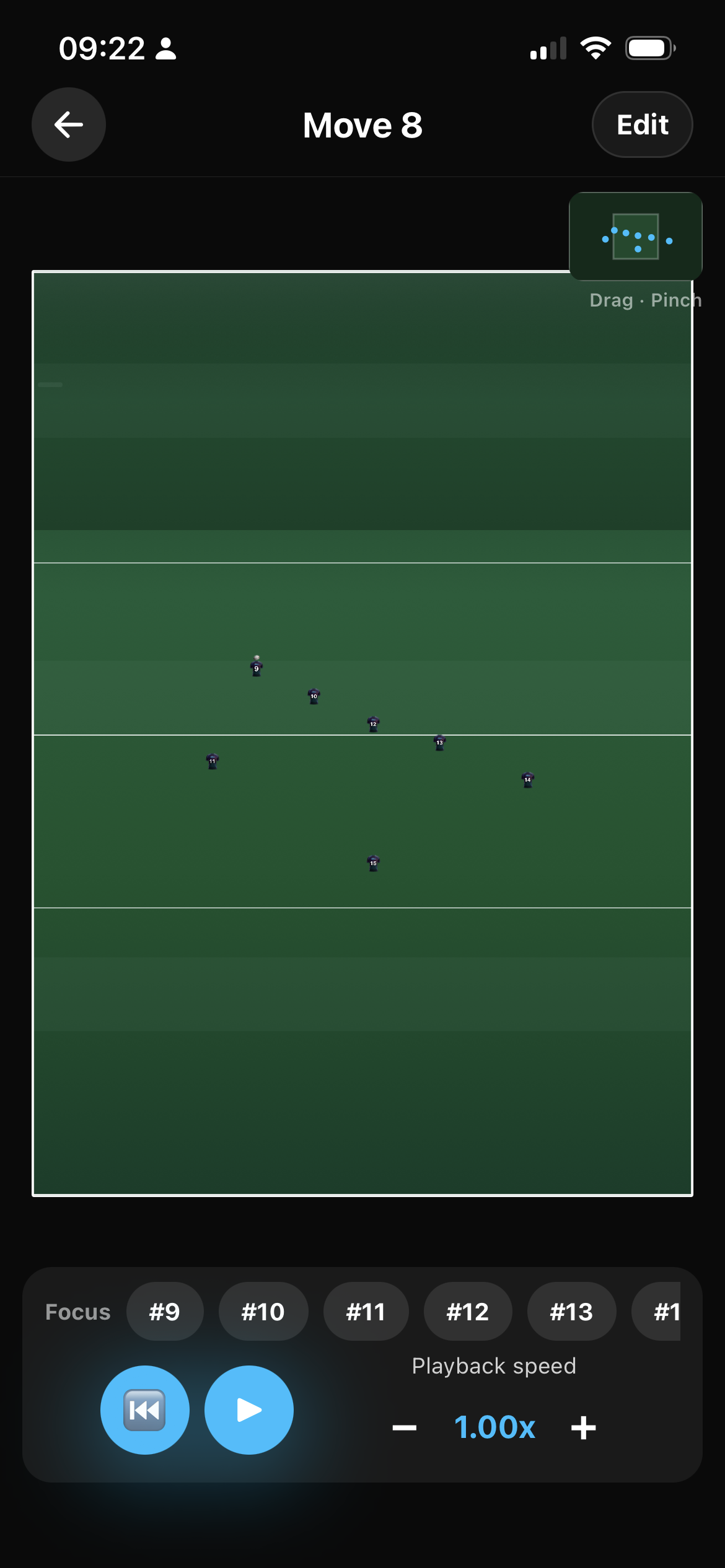
Zoomable pitch
Play it back like a clip — Focus your number
Watch the move animate. Dial playback speed when you want to coach in slow-mo.
Focus a jersey while you watch: pick your number (or a player's role) and the pitch clears to their path only — so a 13 or a wing can see exactly what they need to do, without every other line fighting for attention.
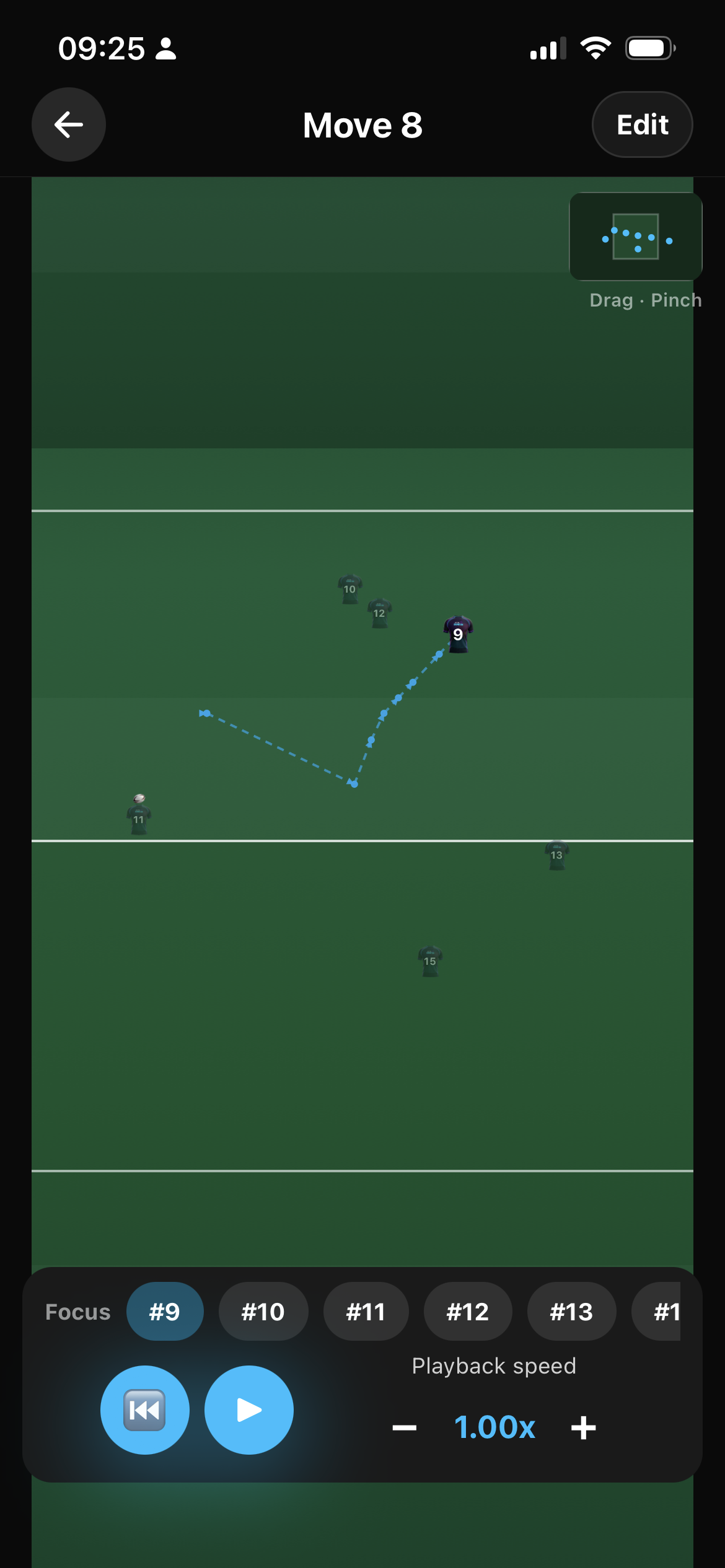
Focus player — one jersey's path only
Library
My Moves, club library, community
My Moves / All Moves
Your creations, starred favourites, and squad-tagged plays in My Moves. Full club library in All Moves.
Save how you want
Private, share with the club (optional team tags), or list in the community library. No club yet? Personal private moves — or share ideas to Community.
Favourites keep next training's plays one tap away. Only the author can edit or delete.
How a session looks (30 seconds)
Backs
Open Moves → + → Standard backs. Edit → Move Builder → Pass 9→10, THEN Switch 10 with 12, THEN Miss to 13. Hit Apply · Save · press play.
Lineout
+ → Lineout 5 or Lineout 7. Place / tweak the pod, add motion or Move Builder off the peel. Show the pack on a phone by the posts.
That's a full shape with timing — before the kettle's boiled.
In short
What Thursday night actually feels like
You sketch the shape on the phone, hit play, and the 13 can see only their line before training starts.
- Open Move Builder and call it like you would on the grass: Switch, Loop, Miss — no drawing every yard of every run.
- Start from backs, a five- or seven-man lineout, touch, or a blank pitch.
- Pinch and drag a real pitch, with room for wings and a sweep that starts wide.
- Focus a jersey so a player watches only their job.
- The move loops while you add the next step, so you can see if the timing works.
- Put a defence on it if you want to show where the gap is.
- Keep it to yourself, share it with the club, or put it in the community library.
Questions
FAQ
Is Rugby Moves free?
Yes. It’s included with the rest of the app — you don’t pay extra for Moves.
Is this AI?
No. You pick Switch, Loop, Miss — rugby calls, not a chat box.
What is Move Builder?
A stepped coach tool: pick the ball carrier's action (Run, Switch, Loop, Pass, Miss, Crash), who they work with, optional Also run, then Apply paths and possession to the pitch.
Can players see just their job?
Yes. On playback, Focus a jersey and the pitch shows only that player's path.
What's My Moves vs All Moves?
My Moves: yours, favourites, and moves tagged to your squads. All Moves: the full club library.
Can I share outside my club?
Yes — list a move in the community library for public ideas, or keep it private / club-only.
Lineouts?
Use Lineout 5 or Lineout 7 templates, then Move Builder or manual motion off the peel.